In this micro course, we will introduce you to a career in digital technology and what a career within the industry entails. We will also look at just a few of the exciting opportunities and careers that exist within this sector.
“Digital” isn’t just a fancy word for computers – it’s about using electronic tools and systems to handle data and information.
Digital Technology is all about how we create and use data and information. It:
Generates data – like when you take a photo, send a message, or post online
Stores data – by saving files, videos, and music on your device or in the cloud
Processes data – through apps that edit photos, stream content, or run games
Digital tools include smartphones, laptops, smartwatches, and even things like virtual assistants (like Siri or Alexa) and automated machines (like Self-checkouts in McDonalds or Smart thermostats in your home).
Digital Is Everywhere – The digital world is all around us – whether you’re streaming music, messaging friends, playing games, shopping online, and even tracking your fitness or sleep, you’re using digital tools. They help us learn, shop, work, and entertain ourselves—and they’re a huge part of our lives and the world around us.
Why Digital Matters To Businesses – Digital tools are faster and more efficient than older methods. They’ve completely changed how industries work—from hospitals and schools to factories and banks. Even careers you might not expect, like construction, farming and fashion, now use digital tech every day. Digital tools make processes more efficient, which then makes the businesses more productive and profitable.
The Future Is Digital – As digital technology becomes increasingly woven into our daily lives and workplaces, careers in this space are expanding across nearly every industry. Being digitally literate — understanding and effectively using digital tools – is now as essential as reading, writing and mathematics.
The digital world is all around us – whether you’re streaming music, messaging friends, playing games, shopping online, and even tracking your fitness or sleep, you’re using digital tools
Did you know?
The average UK household has over 10 connected digital devices!
Living in a Digital World
Digital technology is part of almost everything we do. From the moment we wake up to when we go to sleep, we’re using digital tools – often without even thinking about it.
Here’s a look at how digital activities might show up throughout your day. See how many of these feel familiar!
As of early 2025, 67.8 million people in the UK were using the internet, representing 97.8% of the population. This shows how deeply integrated digital technology is in everyday life – from communication and education to shopping and entertainment.
The Building Blocks of Digital Tech
Essentially there are three key parts to digital tech:
Hardware: the physical parts of a computer or device.
Software: the programs, apps or data that tells a computer or device what to do.
Networks: the different ways of connecting hardware together.
Let’s explore each of these in a bit more detail!
Hardware
Hardware is the physical stuff you can touch – the parts that make up a computer or device. It’s everything from the screen and keyboard to the tiny chips inside.
Main Types of Hardware
Input devices let you give information to the computer. Examples include keyboards, mice, microphones, and cameras.
Output devices show you the results. These include screens, printers, and speakers.
Storage devices save your files and data. Hard drives, SSDs, and USB sticks are all storage devices.
Processing hardware is the brain of the computer. The CPU (Central Processing Unit) and RAM (Randon Access Memory) help your device think and work quickly.
Networking hardware connects your device to the internet or other devices. This includes routers and Wi-Fi cards.
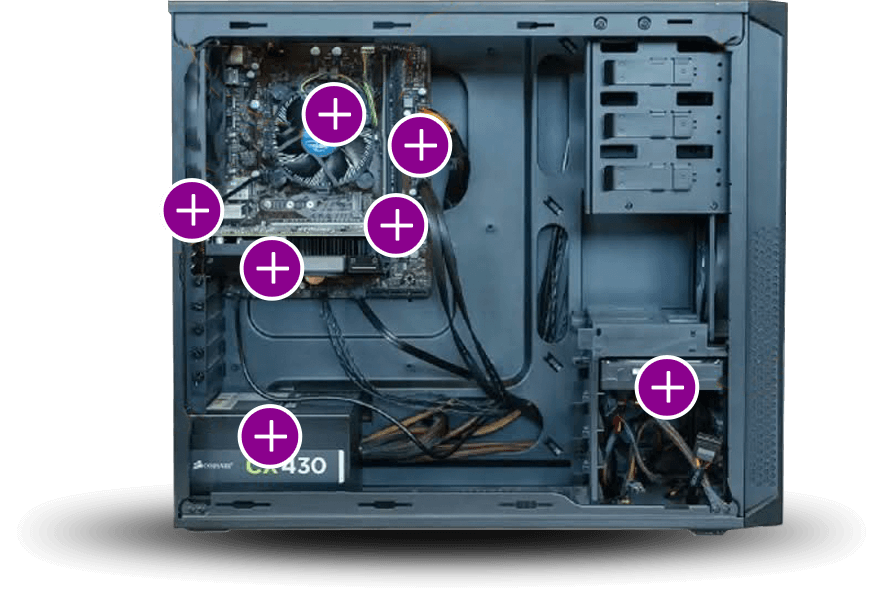
Inside a Computer
If you opened up a computer (carefully!), you’d see a motherboard – the main circuit board that connects everything. You’d also find the CPU, RAM, and storage devices all working together to run your software.
Explore the inside of a computer using the hotpoints shown.
Other Devices – What are Embedded Systems?
Hardware isn’t just inside computers. It’s in phones, tablets, smartwatches, and even things like smart fridges and cars. These devices often use embedded systems—tiny computer systems built into everyday objects to do specific jobs.
Unlike a normal computer that can do lots of things, an embedded system is designed for one main task and usually works automatically. You probably use them every day without even noticing!
Examples of embedded systems:
Cars – Control airbags, engine performance, and navigation systems.
Home appliances – Washing machines, microwaves, and smart fridges manage settings and connect to apps.
Medical devices – Pacemakers and hospital monitors keep patients safe and healthy.
Factories – Robots and sensors help machines work faster and more accurately.
Embedded systems make devices smarter, faster, and more connected. They’re everywhere – from your phone to your car – and they’re a big part of the Internet of Things (IoT), where devices talk to each other to make life easier.
Careers in Hardware If you’re interested in a career working with hardware, there are lots of exciting options. You could explore:
Each of these careers blends problem-solving, creativity, and technical skills, letting you work onthe devices and systems that power our digital world.
What they do: Amira installs, maintains, and troubleshoots computer systems and networks for businesses. She helps people solve technical problems, from fixing hardware to setting up new software and keeping systems secure.
What they like most about the job: Amira enjoys helping others and solving problems quickly. She likes that every day is different and that she gets to work with both people and technology.
How they got into their job: Amira started with a Level 3 IT Support Technician apprenticeship after school. She gained hands-on experience while studying and earned industry certifications like CompTIA A+. She now works full-time and continues to learn on the job.
Amira gained hands-on experience while studying and earned industry certifications like CompTIA A+. She now works full-time and continues to learn on the job.
Did you know?
Modern cars can have over 100 embedded systems, controlling everything from safety features to entertainment!
CPU (Central Processing Unit)
The brain of the computer. It processes instructions and runs programs.
RAM (Random Access Memory)
Short-term memory. It stores data the computer is using right now so it can work quickly.
Motherboard
The main circuit board that connects all parts of the computer together.
Power Supply Unit (PSU)
Converts electricity from the wall into power the computer can use.
Hard Drive / SSD (Storage)
Where files, apps, and the operating system are stored. SSDs are faster than hard drives.
Graphics Card (GPU)
Handles images, videos, and games. Some computers have a separate GPU for better performance.
Ports (USB, HDMI, etc.)
Places where you plug in devices like keyboards, mice, monitors, or USB drives.
Hardware Engineering
Designing and developing physical components like circuit boards, processors, and memory systems.
Computer Engineering
Combining hardware and software to build computing devices, motherboards, and integrated systems.
Electrical Engineering
Creating and maintaining systems that generate and use electricity, such as power grids, motors, and lighting.
Electronic Engineering
Designing electronic devices and circuits, from smartphones to medical equipment.
Embedded Systems Engineering
Developing software that runs directly on hardware, like smartwatches, robots, or SMART devices.
IT Service Engineering
Installing, maintaining, and troubleshooting computers, servers, and networked devices for businesses and homes.
Robotics & Mechatronics Engineering
Building smart machines by combining electronics, mechanics, and computer systems.
Did you know?
Modern computer chips have billions of tiny switches called transistors that help your device think and process information super fast. Apple’s M1 Ultra chip, for example, has 114 billion transistors – more than 14 times the number of people on Earth! These tiny switches are what make your tech work so quickly.
Software
Software is the set of instructions that tells a computer what to do. It’s not something you can touch – it’s the digital part that makes your devices work. Without software, your phone, laptop, or tablet would just be a box of parts!
Types of Software
There are different kinds of software, each with its own job:
System software helps your device run properly. The most important example is the operating system – like Windows, MacOS, or Android – which manages everything on your device.
Application software is what you use to get things done. This includes apps like Microsoft Word, Google Chrome, or games like Minecraft.
Utility software helps keep your device healthy – like antivirus programmes or tools that clean up files.
Programming software is used by developers to create new apps and games. It includes tools like code editors and compilers.
How Software Works
Software is written using programming languages. These languages let people give instructions to computers in a way they can understand.
There are different types of code for different jobs
Scratch and Blockly are great for beginners.
Python is popular for data and AI.
JavaScript makes websites interactive.
Java is used in apps and games.
C++ is used in gaming and system software.
To be a good coder you also need good problem-solving and logic skills.
Software Updates
You’ve probably seen messages telling you to update your apps or operating system. Updates fix problems, improve security, and sometimes add new features. It’s a good idea to keep your software up to date!
All of these careers blend creativity, problem-solving, and technical skills, giving you the chance to create the software, games, and apps that shape the digital world.
Meet Daniel
Sofware Developer
What they do: Daniel designs, builds, and tests software applications used by businesses and consumers. He writes code, collaborates with teams to develop features, and solves bugs to make software run smoothly. His work supports mobile apps, websites, and internal tools that help people work faster and smarter
What they like most about the job: Daniel enjoys turning ideas into functioning programs. He loves the creativity of coding and the satisfaction of seeing his work help real users. He also likes working in a team, sharing knowledge, and continuously improving his skills through new technologies.
How they got into their job: Daniel took a Computer Science A-level and then completed a Software Development apprenticeship, where he learned programming languages like Python and JavaScript. He built real-world projects while studying and earned certifications in web development. After his apprenticeship, he was offered a full-time position and has since progressed into more advanced development roles.
After his apprenticeship, Daniel was offered a full-time position and has since progressed into more advanced development roles.
Did you know?
The first software bug was an actual bug. In 1947, engineers working on the Harvard Mark II computer found that their program was malfunctioning due to a moth stuck in a relay. They carefully removed it and taped it into the logbook with the note “First actual case of bug being found.” That tiny creature gave birth to the term “debugging,” which we still use today.
Software Developer
Designs, codes, tests, and maintains software applications.
Software Engineer
Uses engineering principles to build and improve software systems.
Backend Developer
Builds the “behind-the-scenes” parts of apps and websites, like databases and systems that make everything work smoothly.
Frontend Developer
Designs the parts of websites or apps that users see and interact with.
Full Stack Developer
Works on both frontend and backend development.
DevOps Engineer
Automates and manages software deployment and infrastructure.
IT Support Technician
Helps people solve problems with computers and software.
Web Developer
Specialises in creating websites and web applications.
App Developer
Builds apps for iOS, Android, or multiple platforms.
Game Developer
Designs interactive games and immersive experiences.
Networks
Digital technology creates powerful connections between people, devices, and systems by weaving together different types of networks. These networks enable lightning-fast sharing of information across continents — making global collaboration feel instant and effortless.
Every device within a network is identified by a unique IP address (Internet Protocol address), acting like a digital postcode. These identifiers allow us to locate, link with, and monitor devices securely and precisely.
From video calls with colleagues to smart thermostats in our homes, connected networks make real-time communication and teamwork possible. They’re the silent backbone of modern life, driving innovation in education, remote work, entertainment, and beyond.
Network types
There are lots of different types of networks to connect to:
PAN (Personal Area Networks): A small network for personal devices, like connecting a phone to a smartwatch or wireless headphones.
LAN (Local Area Networks): Connects computers within a limited area like a school, office, or home. It’s fast and secure for internal communication.
WAN (Wide Area Networks): Covers a large geographic area, often connecting multiple LANs. The internet is the largest example of a WAN.
VPN (Virtual Private Networks): These are networks within networks. They create a secure connection over the internet, often used for remote work to access internal systems safely.
Mobile Networks (3G, 4G, 5G): Used for mobile communication. Network engineers may work with telecom providers to maintain and optimise these.
Satellite Networks: Used in remote areas where traditional infrastructure isn’t available. Engineers may work on satellite uplinks and downlinks.
There are different ways of connecting to a network
Wired Connections Ethernet (LAN): Uses a physical cable to connect a device directly to a router, switch, or modem.
Wireless Connections Wi-Fi (WLAN): Connects devices to a local network using radio waves via a wireless router or access point. Bluetooth: Short-range wireless connection for peripherals like keyboards, headphones, or file sharing between devices. Mobile Networks (3G/4G/5G): Connects devices to the internet via mobile phone masts. Satellite: Used in remote areas where traditional broadband isn’t available.
From video calls with colleagues to smart thermostats in our homes, connected networks make real-time communication and teamwork possible.
Careers in networking If you’re interested in how computers and devices connect and share information, a career in networking could be for you. Networking is all about building and maintaining the systems that keep the internet, businesses, and communication running.
What they do: Oli designs, configures, and maintains secure, high-performance networks that keep businesses connected. He manages firewalls, VPNs, switches, and routers, and helps troubleshoot issues across local and cloud infrastructures. His work ensures that users, apps, and services stay online and communicate efficiently and securely.
What they like most about the job: Oli enjoys solving tricky problems and designing networks that can grow and handle lots of users. He enjoys making systems faster and more reliable for the people who use them. Oli also likes working in fast-moving environments and keeping up with the latest technology in networking and security.
How they got into their job: Oli studied ICT in college and gained hands-on experience through an internship in network support. He earned Cisco and CompTIA certifications while working parttime as a helpdesk technician. After proving his technical abilities and soft skills, he transitioned into a full-time engineering role and now leads core infrastructure upgrades and disaster recovery planning.
After proving his technical abilities and soft skills, Oli transitioned into a full-time engineering role and now leads core infrastructure upgrades and disaster recovery planning.
Did you know?
Undersea Cables Carry 99% of Global Internet Traffic – Even though we think of the internet as “wireless,” most international data travels through undersea fibre-optic cables.
Network Engineer
Sets up and maintains the systems that allow computers to communicate.
Systems Analyst
Studies how computer systems work and finds ways to make them better.
IT Service Engineer
Installs and fixes computer networks and systems in workplaces.
Systems Administrator
Manages servers and user accounts to keep networks running smoothly.
Cloud Network Engineer
Builds and manages networks hosted online, using platforms like Google Cloud or Microsoft Azure.
Network Security Engineer
Protects networks from hackers and keeps data safe.
Infrastructure Engineer
Looks after the main IT systems, such as storage, servers, and networks.
Telecommunications Engineer
Works with communication systems like mobile networks, fibre optics, and satellites.
Wireless Network Engineer
Focuses on Wi-Fi and mobile connections so people can stay connected anywhere.
Digital Skills
In today’s fast-changing job market, digital skills are no longer optional – they’re essential. From applying for your first job to changing careers or standing out in your current role, strong digital skills can open doors across every industry.
In school, college, work, or everyday life, being confident with digital tools empowers you to navigate the modern world with confidence, efficiency, and adaptability.
Top 10 Digital Skills Everyone Should Know
Using digital devices confidently Being comfortable using phones, tablets, laptops, and smart devices for everyday tasks.
Managing digital information Knowing how to save, organise, and share files safely using folders or cloud storage.
Communicating online Using email, chats, and video calls clearly and respectfully for school or work.
Creating digital content Making documents, slides, posters, videos, or websites using tools like Canva, Microsoft 365, or simple coding.
Understanding and using data Reading graphs or charts, using spreadsheets, and making sense of facts and figures.
Solving problems with technology Choosing the right apps or tools to make tasks quicker or easier.
Staying safe online Spotting scams, using strong passwords, protecting personal info, and understanding privacy settings.
Adapting to new technology Being curious and ready to learn when new apps or devices appear.
Working together online Using shared documents, project boards, or chat tools to collaborate with others.
Thinking critically online Knowing how to tell if information is real or fake and making smart choices when reading, watching, or sharing things online.
The digital world is growing fast, and you’re part of it. Learning how to use technology wisely and creatively means you can shape the future, not just keep up with it.
Did you know?
82% of job roles in the UK require digital skills!
Digital Careers
Digital careers are among the fastest-growing and most in-demand in the UK and around the world. Whether you’re interested in creativity, problem-solving, or working with data, there’s a digital role for you.
These careers span every industry – from healthcare and finance to entertainment and education.
If you’re starting to think about your GCSEs, aiming for at least a grade 5 in Maths is a great goal — it’s a key skill for many digital careers.
You can also get a head start by choosing one or more of these optional subjects:
Information and Communication Technology (ICT)
Computer Science
Digital Technology
Design and Technology – especially useful if you’re interested in the hardware side of tech careers.
After your GCSEs you have a wide range of options available to you. They fall into 4 main categories: A levels, T levels, V levels and Apprenticeships.
A Levels (Advanced Levels) are the most academic route. They will be largely taught in a classroom and assessed via exams. A Levels in Computing, Maths, and Business will certainly set you up for Higher Education and a digital career.
T Levels (Technical Levels) offer a mix of classroom learning and industry placements. A T Level is the equivalent of three A Levels. So, T Levels give you the chance to start to specialise on the subject area you really enjoy, they are still assessed via exam but tend to be taught more practically through project work. You will also undertake 45 days of work placement alongside your course. Typically, that will mean you are in college 4 days a week and in the workplace 1 day a week. There are three digital T Levels to choose from:
Digital Production, Design and Development
Digital Support Services
Digital Business Services
V levels (Vocational Levels). The UK government have announced a new qualification starting in 2026 but at the time of writing this course, details are still a bit scarce. We believe V levels will be practical, career-focused qualifications designed to give students skills and knowledge for specific industries. They are likely to be similar in level to A Levels or and T Levels but possibly lower in the UCAS points they are worth. They are likely to be designed to help learners move directly into work, apprenticeships, or higher technical education.
Apprenticeships are the most practical courses to study. You will typically be employed in a workplace 4 days a week and you’ll go to college 1 day a week. Depending on your prior knowledge and skills you will either go on to a Level 2 or Level 3 Apprenticeship. There are a wide number of subjects to choose from.
At Level 2 you can choose to do an 8-month Foundation Apprenticeship in:
Hardware, Network and Infrastructure
Software and Data.
At Level 3 you can choose to do an 18-month Advanced Apprenticeship in
Developing yourself isn’t limited to studying courses. Here are some great ways to grow at your own pace:
Online Learning Platforms – Explore free or low-cost courses on platforms like iDEA, Google Digital Garage, Code.org, Scratch, Tynker and Cyber Explorers
Volunteering – Gain experience, build networks, and develop soft skills by contributing to community projects or charities.
Personal Projects – Start a blog, build an app, create digital art, or work on a portfolio—great for showcasing initiative and creativity.
Hackathons and Competitions – Participate in events that challenge your problem-solving and teamwork skills.
Networking and Events – Attend industry talks, webinars, or meetups to learn from professionals and expand your connections.
Reading and Research – Stay informed by reading books, articles, and journals related to your interests or career goals.
Certifications – Earn micro credentials or badges in areas like coding, cybersecurity, or digital marketing. IBM’s Skills Build is a great place to start.
Mentoring or Being Mentored – Learn from others or share your knowledge—both are valuable experiences.
Internships and Work Experience – Short-term placements can offer real world insights and help you build confidence.
Clubs and Societies – Join groups that align with your interests—great for teamwork, leadership, and fun!
You are probably already studying A levels, T level, V level, or an Apprenticeship and starting to think about what next. When you finish your current course, you have a wide range of options available to you.
They fall into 3 main categories: Higher Technical Education, an Honours Degree, or an Apprenticeship.
Higher Technical Education These are shorter Higher Education courses which are the equivalent to the first or second year of a University Degree. They are usually quite practical and involve project work and portfolio building. Depending on the subject and industry requirements there may be some exams, but they are usually assessed through coursework. There are four types of Higher Technical Education available to you.
Higher National Certificate (HNC)
Length: 1 year full-time (or 2 years part-time)
Level: Equivalent to the first year of a university degree (Level 4)
Focus: Practical and technical skills in areas like engineering, computing, or business
Benefits:
Quick entry into the workforce
Can lead directly to an HND or second year of a degree
There are a wide range of HNC titles to choose from, including:
HNC Computer Science
HNC Data Analysis
HNC Network Engineering
HNC Cyber-Security Technologist
HNC Electrical Engineering
HNC Robotics & Mechatronics
HNC Creative Media & Technology
HNC Architectural Technology
Higher National Diploma (HND)
Length: 2 years full-time (or 3–4 years part-time)
Level: Equivalent to the first two years of a university degree (Level 5)
Focus: More in-depth than an HNC, with a strong focus on job-specific skills
Benefits:
Prepares you for a specific career
Can lead to the final year of a full Honours Degree
There are a range of HNC titles to choose from, including:
HND Computer Science
HND Electrical Engineering
HND Creative Media & Technology
HND Computing & Software Development
Higher Technical Qualification (HTQ)
Length: Typically, 1–2 years full-time (varies by subject)
Level: Level 4–5 (equivalent to HNC/HND)
Focus: Industry-focused, hands-on training designed to meet the skills employers are looking for in technical roles
Benefits:
Directly prepares you for skilled work in high-demand sectors
Recognised by employers across the UK, often developed with industry partners
Can lead to further study, including HND or degree “top-up” programmes
There are a wide range of HTQ subjects available, including:
HTQ Digital Technologies
HTQ Advanced Manufacturing
HTQ Cyber Security
HTQ Data Analytics
HTQ Engineering Practice
HTQ Creative Digital Media
Foundation Degree
Length: 2 years full-time (or longer part-time)
Level: Also Level 5, like an HND
Focus: Combines academic study with workplace learning
Benefits:
Designed with employers, so very career-focused
Can be “topped up” to a full degree with one more year of study
There are a range of HNC titles to choose from, including:
FdSc Computing
FdEng Electronic Engineering
Don’t confuse a Foundation Degree with a Foundation Year. A Foundation Year is an extra year sometimes bolted on to the start of an Honours Degree designed to gently ease students on to the Degree when they didn’t quite meet the entry requirements.
Honours Degree Degrees are longer and more academic. But that doesn’t mean more exams. Some of the industry bodies that endorse these courses still insist on some exams but in the main you will be assessed by course work. The courses will include a mixture of classroom teaching, online teaching, independent study and practical work. If you prefer more hands-on-learning, then look for a university that offers a more “practice led” or “real world learning” curriculum.
Honours Degree
Length: 3–4 years full-time
Level: Full undergraduate degree (Level 6)
Focus: Academic and/or practical study in a specific subject
Benefits:
Deepen your knowledge in a subject you’re passionate about.
Open up high-level career opportunities and pathways to postgraduate study.
There are a wide range of titles to choose from, including:
BSc (Hons) Computing
BSc (Hons) Computer Science
BSc (Hons) Network Engineering
BSc (Hons) Software Engineering
BSc (Hons) Data Science and Analytics
BSc (Hons) Cyber Security
BEng (Hons) Electronic Engineering
BA (Hons) Graphic Design
BA (Hons) Animation
BSc (Hons) Computer Games
BA (Hons) CGI and Visual Effects
BA (Hons) Architectural Design and Technology
Apprenticeship Apprenticeships are the most practical courses to study. Apprenticeships let you work and earn while you learn, combining a job with training. You will typically be employed in a workplace 4 days a week and you’ll go to your training provider 1 day a week.
Apprenticeship
Length: 1–5 years (depending on the level)
Level: Ranges from Level 4 (Higher) to Level 6 (Degree)
Focus: Learn on the job while studying part-time for a qualification.
Benefits:
Get paid while gaining real experience and a recognised qualification.
Learn directly from professionals in your chosen industry.
The level of apprenticeship that you start at will depend on your prior knowledge and skills. At each Level there are a wide number of titles to choose from, including:
At Level 4 you can choose to do a 24-month Higher Apprenticeship in:
Network Engineer
Software Developer
DevOps Engineer
Applications Support Lead
Data Analyst
Data Engineer
Cyber Security Technologist
Digital Product Manager
At Level 6 you can choose to do a 36–48-month Degree Apprenticeship in:
Developing yourself isn’t limited to studying courses. Here are some great ways to grow at your own pace:
Online Learning Platforms – Explore free or low-cost courses on platforms like iDEA, Google Digital Garage, Code.org, Scratch, Tynker and Cyber Explorers
Volunteering – Gain experience, build networks, and develop soft skills by contributing to community projects or charities.
Personal Projects – Start a blog, build an app, create digital art, or work on a portfolio—great for showcasing initiative and creativity.
Hackathons and Competitions – Participate in events that challenge your problem-solving and teamwork skills.
Networking and Events – Attend industry talks, webinars, or meetups to learn from professionals and expand your connections.
Reading and Research – Stay informed by reading books, articles, and journals related to your interests or career goals.
Certifications – Earn micro credentials or badges in areas like coding, cybersecurity, or digital marketing. IBM’s Skills Build is a great place to start.
Mentoring or Being Mentored – Learn from others or share your knowledge—both are valuable experiences.
Internships and Work Experience – Short-term placements can offer real world insights and help you build confidence.
Clubs and Societies – Join groups that align with your interests—great for teamwork, leadership, and fun!
Your starting point will depend on your prior experience and qualifications. But whatever your experience and qualifications it’s not too late to pursue a career in the digital sector.
Basic Digital Literacy Courses
If you are starting from scratch and need to improve your basic digital skills our digital literacy courses are a perfect introduction for you.
Length: They vary from a few hours to a few weeks
Level: Introductory
Focus: Teaches essential digital skills like using email, online safety, word processing, and spreadsheets
Benefits:
Builds confidence with technology for everyday life, study, or work
Most of our education partners offer Essential Digital Skills short courses
Bootcamps
If you have good digital literacy skills and want to fast track into a specific job, a digital skills bootcamp will give you the boost in knowledge and skills that you need for that specific role. If you are unemployed, you are also guaranteed an interview at the end of the course.
Length: 8–16 weeks (intensive)
Level: Varies (often Level 3–5)
Focus: Fast-track training for specific industry skills gaps
Benefits:
Gain job-ready skills in a short time
Often includes real-world projects and employer links
Most of our education partners offer Bootcamp Digital Skills short courses:
Hampshire County Council offer Skills Bootcamps in Artificial Intelligence (AI), Coding, Cyber Security, Data Analytics, and Digital Marketing.
Solent Growth Partnership offer Skills Bootcamps in Gaming, AI Leadership, Digital Marketing, and Software Development.
Access to Higher Education courses
An Access to HE course is a great way to get back into education if you didn’t take the traditional route to university. It gives you the chance to build your confidence and develop the academic skills you’ll need for higher-level study. Best of all, it’s designed to be completed in just one year, helping you move forward quickly toward your career or university goals.
Length: 1 year full-time (or 2 years part-time)
Level: Prepares you for university (Level 3)
Focus: Designed for people who don’t have traditional qualifications like A-levels
Benefits:
Opens the door to university for mature learners or career changers
Builds academic skills and confidence
There are a range of HNC titles to choose from, including:
Computing
Business and Information Technology
Engineering
Science
Social Science
Higher Technical Education These are shorter Higher Education courses which are the equivalent to the first or second year of a University Degree. They are usually quite practical and involve project work and portfolio building. Depending on the subject and industry requirements there may be some exams, but they are usually assessed through coursework. There are four types of Higher Technical Education available to you.
Higher National Certificate (HNC)
Length: 1 year full-time (or 2 years part-time)
Level: Equivalent to the first year of a university degree (Level 4)
Focus: Practical and technical skills in areas like engineering, computing, or business
Benefits:
Quick entry into the workforce
Can lead directly to an HND or second year of a degree
There are a wide range of HNC titles to choose from, including:
HNC Computer Science
HNC Data Analysis
HNC Network Engineering
HNC Cyber-Security Technologist
HNC Electrical Engineering
HNC Robotics & Mechatronics
HNC Creative Media & Technology
HNC Architectural Technology
Higher National Diploma (HND)
Length: 2 years full-time (or 3–4 years part-time)
Level: Equivalent to the first two years of a university degree (Level 5)
Focus: More in-depth than an HNC, with a strong focus on job-specific skills
Benefits:
Prepares you for a specific career
Can lead to the final year of a full Honours Degree
There are a range of HNC titles to choose from, including:
HND Computer Science
HND Electrical Engineering
HND Creative Media & Technology
HND Computing & Software Development
Higher Technical Qualification (HTQ)
Length: Typically, 1–2 years full-time (varies by subject)
Level: Level 4–5 (equivalent to HNC/HND)
Focus: Industry-focused, hands-on training designed to meet the skills employers are looking for in technical roles
Benefits:
Directly prepares you for skilled work in high-demand sectors
Recognised by employers across the UK, often developed with industry partners
Can lead to further study, including HND or degree “top-up” programmes
There are a wide range of HTQ subjects available, including:
HTQ Digital Technologies
HTQ Advanced Manufacturing
HTQ Cyber Security
HTQ Data Analytics
HTQ Engineering Practice
HTQ Creative Digital Media
Foundation Degree
Length: 2 years full-time (or longer part-time)
Level: Also Level 5, like an HND
Focus: Combines academic study with workplace learning
Benefits:
Designed with employers, so very career-focused
Can be “topped up” to a full degree with one more year of study
There are a range of HNC titles to choose from, including:
FdSc Computing
FdEng Electronic Engineering
Don’t confuse a Foundation Degree with a Foundation Year. A Foundation Year is an extra year sometimes bolted on to the start of an Honours Degree designed to gently ease students on to the Degree when they didn’t quite meet the entry requirements.
Honours Degree Degrees are longer and more academic. But that doesn’t mean more exams. Some of the industry bodies that endorse these courses still insist on some exams but in the main you will be assessed by course work. The courses will include a mixture of classroom teaching, online teaching, independent study and practical work. If you prefer more hands-on-learning, then look for a university that offers a more “practice led” or “real world learning” curriculum.
Honours Degree
Length: 3–4 years full-time
Level: Full undergraduate degree (Level 6)
Focus: Academic and/or practical study in a specific subject
Benefits:
Deepen your knowledge in a subject you’re passionate about.
Open up high-level career opportunities and pathways to postgraduate study.
There are a wide range of titles to choose from, including:
BSc (Hons) Computing
BSc (Hons) Computer Science
BSc (Hons) Network Engineering
BSc (Hons) Software Engineering
BSc (Hons) Data Science and Analytics
BSc (Hons) Cyber Security
BEng (Hons) Electronic Engineering
BA (Hons) Graphic Design
BA (Hons) Animation
BSc (Hons) Computer Games
BA (Hons) CGI and Visual Effects
BA (Hons) Architectural Design and Technology
Apprenticeship Apprenticeships are the most practical courses to study. Apprenticeships let you work and earn while you learn, combining a job with training. You will typically be employed in a workplace 4 days a week and you’ll go to your training provider 1 day a week.
Apprenticeship
Length: 1–5 years (depending on the level)
Level: Ranges from Level 4 (Higher) to Level 6 (Degree)
Focus: Learn on the job while studying part-time for a qualification.
Benefits:
Get paid while gaining real experience and a recognised qualification.
Learn directly from professionals in your chosen industry.
The level of apprenticeship that you start at will depend on your prior knowledge and skills. At each Level there are a wide number of titles to choose from, including:
At Level 4 you can choose to do a 24-month Higher Apprenticeship in:
Network Engineer
Software Developer
DevOps Engineer
Applications Support Lead
Data Analyst
Data Engineer
Cyber Security Technologist
Digital Product Manager
At Level 6 you can choose to do a 36–48-month Degree Apprenticeship in:
Developing yourself isn’t limited to studying courses. Here are some great ways to grow at your own pace:
Online Learning Platforms – Explore free or low-cost courses on platforms like iDEA, Google Digital Garage, Code.org, LinkedIn Learning, Future Learn, and Open Learn
Volunteer or Freelance – Offer digital help to charities, small businesses, or community groups – great for experience and networking.
Personal Projects – Start a blog or YouTube channel, design a game, build an app, create digital art, or work on a portfolio – great for showcasing initiative and creativity.
Take Part in Online Challenges – Join competitions like hackathons, game jams, or digital design contests to test your skills and creativity.
Networking and Events – Attend industry talks, webinars, or meetups to learn from professionals and expand your connections.
Reading and Research – Stay informed by reading books, articles, and journals related to your interests or career goals.
Attend Webinars and Online Events – Stay current by joining free tech talks, workshops, or virtual meetups
Earn Industry Certifications – Earn micro-credentials or badges in areas like coding, cybersecurity, or digital marketing. IBM’s Skills Build, Microsoft Office Specialist, Google IT Support, or Adobe Certified Professional are a great place to start.
Mentoring or Being Mentored – Learn from others or share your knowledge – both are valuable experiences.
Internships and Work Experience – Short-term placements can offer real-world insights and help you build confidence.
Choosing a course that combines academic learning and hands on experience like T levels, HTQs and Apprenticeships will give you a stronger CV, which will make you much more employable.
Did you know?
Many tech professionals started learning from YouTube and free online courses!
Did you know?
Choosing a course that combines academic learning and hands on experience like HTQs, “Practice led” Degrees and Apprenticeships will give you a stronger CV, which will make you much more employable.
Check Your Knowledge
So now you’re well on the way to understanding about Digital Technology, answer the multi-choice questions below to see how much you really know.
Good luck!
1. Which of the following best describes what “digital” means?
2. Why is digital technology important for businesses today?
3. What are the three main building blocks of digital technology?
4. Which of the following is an example of processing hardware in a computer?
5. What do output devices do?
6. Which of the following is an example of system software?
7. Which of the following best describes what a Frontend Developer does?
8. Which type of network is typically used to connect personal devices like a phone and smartwatch?
9. What is the main role of a network engineer?
10. Why are digital skills important in today’s job market?
Well done. You have successfully achieved the pass mark for this course. All the correct answers are now shown.
You haven’t achieved the pass mark on this occasion. Have another go.
You haven’t quite reached the pass mark for this course, but all of the correct answers are now shown. Please study these before moving on, or feel free to go back and look again at any of the pages of this course.
eCommerce refers to the buying and selling of goods and services online.
Automated picking is where a machine grabs several products and packs goods onto a pallet that is then labelled and scanned by another machine.
Door-to-door delivery is when a company delivers products from the seller's warehouse to the customer's location.
The last mile refers to the final step of the delivery process from a distribution centre or facility to the customer. The customer may be a retail store, a business, or a consumer at home.
Optimising in this context means increasing efficiency and decreasing the number of miles driven.
Time sensitive goods are goods which must be delivered as quickly as possible because their quality or effectiveness reduces over time.
Intermodal transportation means moving goods by 2 or more methods of transport, without needing to unload the cargo.
Globalisation is the process by which the world is becoming increasingly connected through technology, trade, and integration amongst people.
The European Union (EU) is a collection of countries, which aim to co-operate on trade, social affairs and certain laws.
A customs declaration is an official document that lists and gives details of goods that are being imported or exported.
Salmonella is a bacteria and is one of the most common forms of food poisoning.
Pesticides are substances that are used to control pests on plants and animals.
Gases in the atmosphere such as carbon dioxide trap heat (similar to the glass roof of a greenhouse).
A carbon footprint is the amount of greenhouse gases generated by our actions.
The National Grid distributes electricity across the UK. It connects power stations to homes, workplaces and public buildings all around the country.
Microplastics are tiny fragments of plastic. They are often formed from larger pieces of plastic (e.g., drinks bottles and plastic bags) that break down slowly.
The Mobius loop was first described by the mathematician and astronomer August Ferdinand Möbius (1790-1868) in 1858.
The circular economy refers to society putting waste back into a good use and continuing this cycle.