

minutes average completion time
Digital Technology
In this micro course, we will introduce you to a career in digital technology and what a career within the industry entails. We will also look at just a few of the exciting opportunities and careers that exist within this sector.
Industry case study: Digital Technology in action
How Amazon Uses Digital Technology to Deliver Your Order by Tomorrow.
Amazon is one of the world’s largest online retailers, and it’s famous for delivering millions of products – sometimes within just 24 hours. But how does it all work? Let’s explore the digital technologies behind the scenes.
Why This Matters for You
Amazon shows how digital skills like coding, AI, cybersecurity, and automation drive big businesses. Careers in software, data, and robotics are in high demand, combining problemsolving and creativity. Learning these skills now can open doors to exciting, future-proof jobs in technology and e-commerce.
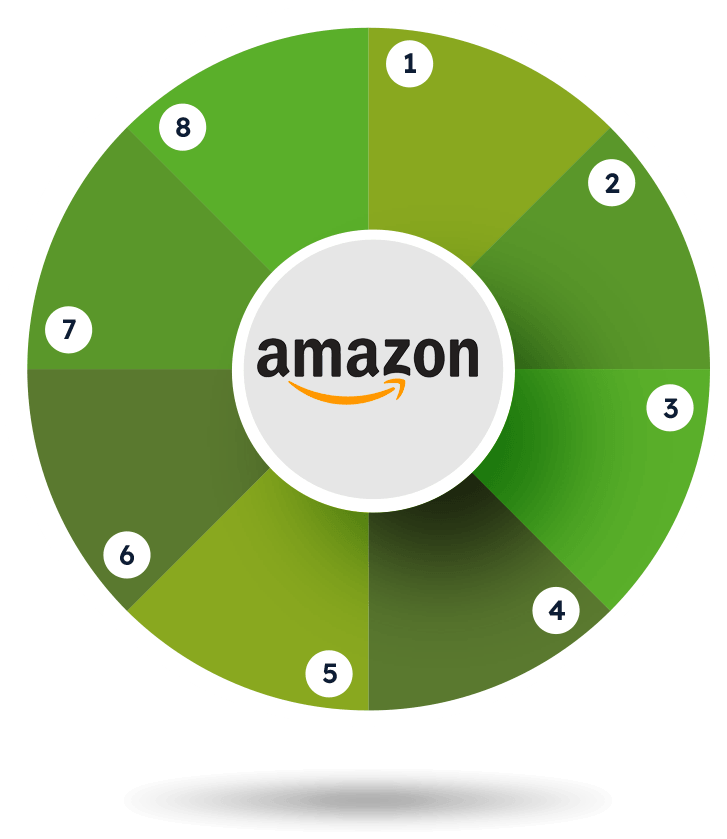
Click on the segments below to discover how Amazon embraced digital technology.
Did you know?
Amazon is testing drone delivery to drop off parcels in under 30 minutes! These flying robots use GPS and sensors to safely navigate the skies and land in your garden.
Step 1: The Website
Amazon’s website and mobile app use smart search and recommendation systems to help you:
- Find products quickly with keywords or filters
- See personalised suggestions based on your past activity
- Read reviews, compare prices, and make choices easily
Careers involved:
- Front-End Developer – Builds what users see on websites
- UX Designer – Makes websites easy and enjoyable to use
- Data Scientist – Creates recommendation systems
Skills required:
Writing basic code for websites (HTML, CSS, JavaScript), using Python for simple programs, understanding data, and thinking about how people use websites.
Step 2: Product Information
Each product page shows:
- High-quality images and videos
- Detailed descriptions and specifications
- Customer reviews and Q&A
Careers involved:
- Content Manager – Oversees product listings
- Database Administrator – Maintains product databases
- Photographer / Video Editor – Creates visuals
Skills required:
Managing online content (Content Management System tools), working with databases (SQL), taking and editing photos or videos.
Step 3: Customer Information
When you order, Amazon collects:
- Your name, address, and contact details
- Payment method
- Order history and preferences
Careers involved:
- Cybersecurity Analyst – Protects customer data
- Data Engineer – Organises and processes information
Skills required:
Keeping data safe (encryption), following privacy rules (General Data Protection Regulation), organising information in databases.
Step 4: Safe Banking
Amazon protects your payments with:
- Two-factor authentication
- Fraud detection systems
- Amazon Pay for secure checkouts
Careers involved:
- Payment Systems Developer – Builds secure payment systems
- Cybersecurity Specialist – Stops online fraud
Skills required:
Writing secure code, understanding cryptography, spotting risks and fraud.
Step 5: Artificial Intelligence (AI) and Machine Learning
AI helps Amazon to:
- Predict what products you might want
- Optimise warehouse operations
- Power Alexa voice shopping
- Detect fake reviews or fraud
Careers involved:
- AI Engineer – Builds smart learning programs
- Voice Interface Developer – Works on Alexa
Skills required:
Using Python, understanding how machines learn from data, analysing patterns.
Step 6: Product Picking and Packing
Amazon’s Smart Fulfilment Centres mix people and automation to process millions of orders:
- Robots move and sort products efficiently
- Barcode systems track inventory
- Software coordinates picking, packing, labelling, and shipping
- Products are stored across shelves to save space and speed up orders
Careers involved:
- Robotics Engineer – Designs smart machines
- Logistics Analyst – Improves warehouse efficiency
Skills required:
Using automation and IoT, managing warehouse systems.
Step 7: Route Optimisation and Delivery Tracking
Amazon ensures fast deliveries with:
- GPS tracking of vehicles
- Route optimisation software
- Real-time updates so you can track parcels
Careers involved:
- Software Developer – Builds tracking systems
- Data Analyst – Finds the fastest delivery routes
Skills required:
Using GPS and tracking tools, analysing data, checking real-time information.
Step 8: Digital Invoicing and Order Management
Behind the scenes, Amazon:
- Creates digital receipts and invoices
- Tracks inventory levels
- Manages returns and refunds automatically
Careers involved:
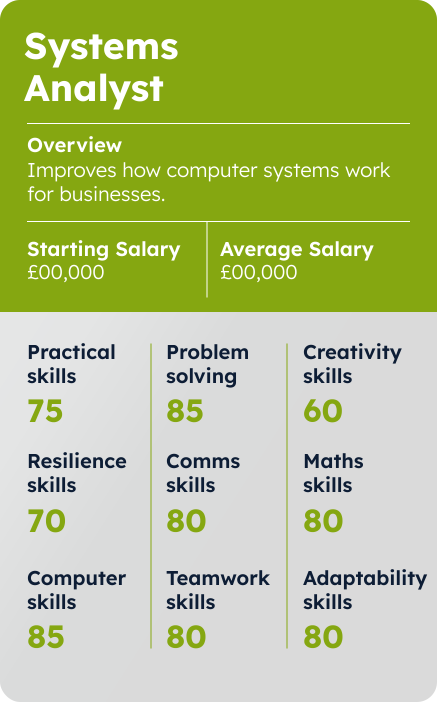
- Systems Analyst – Maintains order systems
- Database Developer – Handles inventory information
Skills required:
Organising data (SQL), using software to manage orders, automating tasks.
What is Digital Technology?
As you learned in the “Digital Foundations” module, digital technology is all about data.
It helps us manage information in three main ways:
- Generates data – every time you take a photo, send a message, or play a game, new data is created.
- Stores data – files, photos, videos, and music are saved so you can access them later.
- Processes data – apps, software, and streaming services use this data to do things, like edit photos, play videos, or suggest content you might like.
Digital technology is everywhere. From the phones in our pockets to the systems that run hospitals, schools, and transport networks, we create, store, and process massive amounts of data every day. All the devices and apps we use rely on this data to work properly, which is why understanding how it’s collected, organised, and used is so important. In the next section, we’ll explore the basics of data, how it’s collected, stored, and protected, and the exciting careers and skills that come with working in the world of data.
Data Basics
- Bit – The tiniest piece of data in a computer. It’s either a 1 or a 0.
- Byte – A group of 8 bits. It’s usually enough to store one letter or symbol.
- Data – Raw facts and figures, like numbers or words, that computers can use.
- Metadata – Data about data! For example, the date a photo was taken or the size of a file.
- File – A saved piece of work, like a photo, document, or video.
- Database – A digital filing system that stores lots of organised data.

How Do We Collect Data?
Data is collected whenever technology records information about what we do, use, or choose. This could be a fitness tracker recording your steps, a website tracking which pages you visit, or a survey gathering opinions. Businesses and organisations collect data to understand customer behaviour, improve products, or make decisions. Even sensors in cars, hospitals, and smart homes collect data to monitor performance and safety.
Where Is Data Stored?
Data is stored in different places depending on how it will be used. Some data stays on your device, like photos or schoolwork, while larger amounts are saved on servers in offices or in the cloud. Storage types vary in speed and capacity — fast memory like RAM for active tasks, hard drives or SSDs for long-term storage, and cloud servers for remote access.
How Is Data Used?
Data helps make decisions, solve problems, and improve everyday life. Businesses use it to understand what customers like, schools track student progress, and apps recommend music, videos, or products you might enjoy. In healthcare, data helps doctors diagnose and treat patients more accurately. When used responsibly, data makes systems smarter, faster, and more personalised.
How Is Data Protected?
Data protection means keeping information safe from loss, theft, or misuse. This includes using passwords, encryption, firewalls, and cybersecurity practices. Organisations also follow laws like General Data Protection Regulation (GDPR) to protect personal data. Keeping data secure is a vital part of digital technology.
Every time we interact with data we leave a Digital footprint. A Digital Footprint is a trail of information you leave online through what you share, do, and the data websites and apps collect about you.

Working with data opens up a wide range of careers across different areas:
Collecting Data
- Data Analyst – Examines information to find patterns and trends.
- UX Researcher – Studies how people interact with products to improve usability.
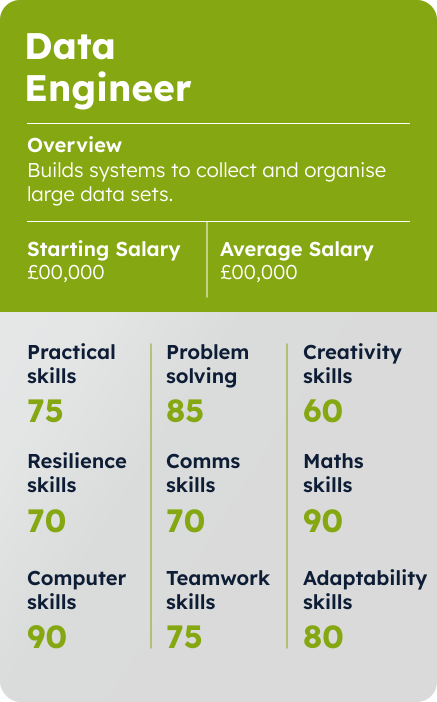
- Data Engineer – Builds and manages systems to collect and organise data.
Storing Data
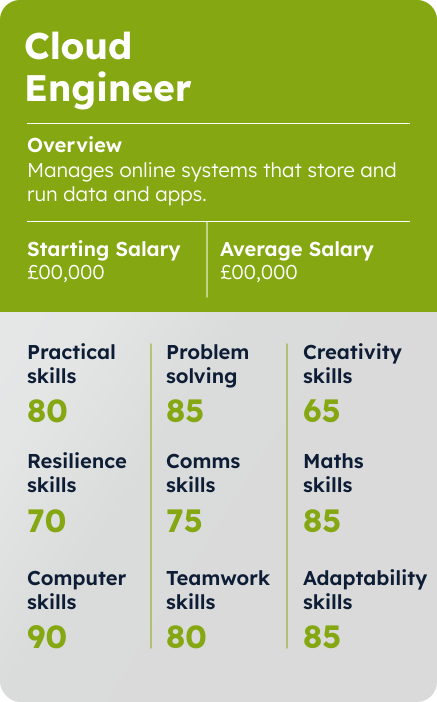
- Cloud Engineer – Designs and maintains cloud-based storage and systems.
- Network Technician – Ensures computer networks run smoothly and securely.
- Database Administrator – Manages databases to keep data accurate and accessible.
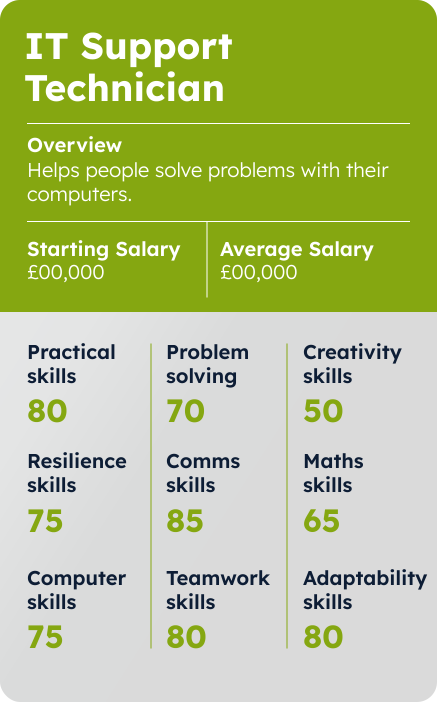
- IT Support – Helps people and organisations troubleshoot technology issues.
Using Data
- Business Intelligence Specialist – Creates insights and reports to support decisions.
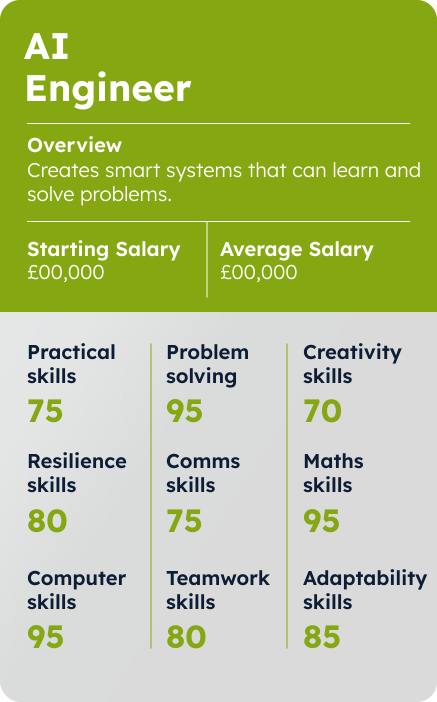
- AI Engineer – Develops systems that can learn and make predictions from data.
- Digital Marketing Analyst – Analyses online data to improve marketing strategies.
Protecting Data
- Cybersecurity Analyst – Defends systems against cyberattacks and threats.
- Ethical Hacker – Tests systems to identify vulnerabilities before real hackers can exploit them.
- IT Security Consultant – Advises organisations on how to secure their digital systems.
Skills you’ll need:
- Technical Skills: Using data tools like Excel, Tableau, or databases, Basic coding (Python, R, or Java), Data analysis and visualisation, Cloud and storage basics, Understanding cybersecurity and data protection
- Soft Skills: Analytical thinking, Problem-solving, Attention to detail, Communication, Teamwork, Ethical awareness
In summary
Digital technology shapes how we live, learn, and work by generating, storing, using, and protecting data. Every time we go online, send a message, or use an app, we interact with data that helps drive decisions, power innovation, and connect the world around us. Understanding how information moves through these systems – and how to handle it safely – opens doors to a wide range of exciting and future-focused careers, from data analysis and cloud computing to AI and cybersecurity.
Understanding how information moves through these systems – and how to handle it safely – opens doors to a wide range of exciting and future-focused careers, from data analysis and cloud computing to AI and cybersecurity.

Applied Digital Technology
Digital technology is all around us — from how we shop and pay for things, to how we look after our health and unwind after a long day. “Applied Digital Technology” means using digital tools, systems, and data to solve real-world problems and make everyday life easier, mfaster and more connected.
Let’s explore how digital innovation is transforming five major industries – and the exciting career paths waiting for you.





E-commerce is how we buy and sell goods and services online – from ordering trainers on ASOS to selling your old phone on Vinted.
Behind every online shop are powerful technologies that track stock, manage payments, recommend products, and deliver your order right to your door.
Digital tools like artificial intelligence (AI), machine learning and data analytics help companies understand what customers want and improve their shopping experience.
Career opportunities:
Web developer
Builds and maintains websites, making sure they look good and work properly.
Digital marketing specialist
Creates online campaigns to help businesses reach customers through social media, email, and ads.
Data analyst
Looks at information to find patterns and trends that help businesses make better decisions.
UX/UI designer
Designs websites or apps so they are easy to use, look good, and give people a great experience.
FinTech is reshaping how we handle money. Think about how you use online banking, Apple Pay or PayPal — that’s FinTech in action. These technologies make banking faster, safer, and more personalised.
FinTech companies use coding, cybersecurity, and data science to build tools that help people budget, invest, and protect their money. It’s an industry that’s always evolving, driven by innovation and trust.
Career opportunities:
Software developer
Creates the programs and apps that make financial services work, like banking apps or payment systems.
Cybersecurity analyst
Protects financial systems and customer data from hackers and cyber-attacks.
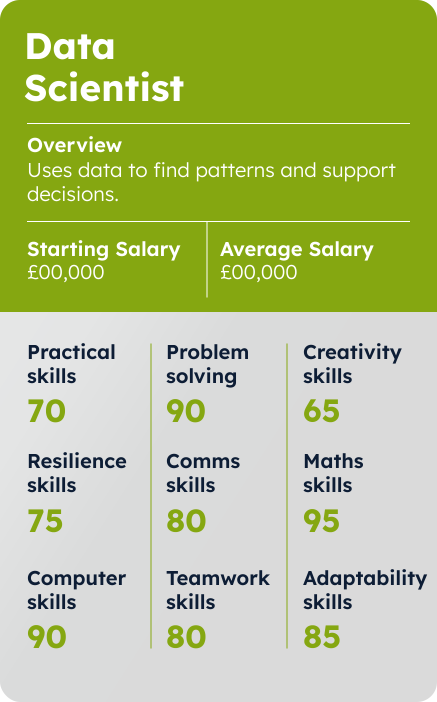
Data scientist
Analyses financial data to spot trends, make predictions, and help banks or apps make smarter decisions.
Financial app designer
Designs banking and finance apps so they are easy to use, safe, and look appealing for customers.
HealthTech combines healthcare and technology to improve people’s lives. From fitness trackers and mental health apps to hospital robots and digital medical records, HealthTech helps patients and professionals stay connected and informed.
In the UK, the NHS uses HealthTech to diagnose conditions, schedule appointments, and manage treatments more efficiently. This sector is growing fast, creating opportunities for people who care about health and innovation.
Career opportunities:
Clinical software developer
Creates computer programs and apps used in hospitals and clinics, such as systems to manage patient records or help with diagnoses.
Biomedical engineer
Designs and develops medical devices, equipment, and technology that help doctors and patients.
Health data analyst
Looks at health information to spot trends, improve patient care, and help hospitals make better decisions.
UX/UI Designer
Designs health apps and systems so they are easy to use and understand for doctors, nurses, and patients.
Whether it’s streaming music on Spotify, watching Netflix, or playing Fortnite with friends, digital entertainment is part of daily life. It brings together creativity, storytelling, and technology.
This industry uses advanced graphics, coding, and interactive design to create immersive experiences. With virtual reality (VR), augmented reality (AR), and AI becoming mainstream, the possibilities are endless for those who love tech and creativity.
Career opportunities:
Game developer
Designs and builds video games, including the story, characters, and how the game works.
Digital animator
Creates moving images and animations for games, films, and online content.
Content creator
Produces videos, images, or posts for social media, YouTube, or websites to entertain or inform people.
AR/VR developer
Makes immersive experiences using Augmented Reality (AR) or Virtual Reality (VR), like games or interactive simulations.
In summary
Applied digital technology powers almost every part of modern life. Whether you’re drawn to creativity, problem- solving, or innovation, there’s a place for you in the digital world.
Exploring these industries will help you understand how digital skills open doors to future careers – and how you can be part of shaping what comes next.
Did you know?
Over one in five retail purchases in the UK are now made online? From small independent sellers on Etsy to giants like ASOS and Amazon, e-commerce has transformed the way we shop – creating a huge range of digital careers.
Did you know?
London is one of the world’s top FinTech hubs, home to digital banking leaders like Monzo, Revolut, and Starling? These companies use technology to make managing money faster, safer, and more accessible – and they’re creating thousands of new tech jobs every year.
Did you know?
The NHS uses artificial intelligence (AI) to help doctors detect diseases earlier and improve patient care? HealthTech innovations like smartwatches, health apps, and digital records are helping people stay healthier and giving doctors faster, more accurate insights.
Did you know?
Netflix’s recommendation engine is so precise that it influences about 80% of what people watch, using algorithms that consider not just what you’ve seen, but how long you watched, when you paused, and what you skipped.
Design That Works: Exploring UX/UI Careers
No matter the industry – whether you’re streaming, shopping, gaming, or chatting online – great design makes the difference between frustration and fun. UX and UI designers are the creative minds making digital experiences easy, enjoyable, and accessible for everyone.
UX (User Experience) and UI (User Interface) design are all about how people use and feel when interacting with digital products like websites, apps, or games.
- UX focuses on how something works – making it simple, smooth, and user-friendly.
- UI focuses on how something looks – the layout, colours, and buttons that make it attractive and easy to navigate.
Good UX/UI design matters because it helps people use technology easily and enjoyably. If a website or app is confusing, people stop using it. Well-designed digital products improve business success and make technology more inclusive for everyone.
Careers in UX and UI:
- UX /UI Designer – Makes apps, websites, and products easy and enjoyable for people to use.
- Product Designer – Combines UX and UI skills to design complete digital products from start to finish.
- Accessibility Specialist – Ensures websites, apps, and products are usable by everyone, including people with disabilities.

Skills you’ll need:
- Technical: Wireframing, prototyping (using Figma or Adobe XD), visual design, basic coding (HTML/CSS), user testing, and accessibility design.
- Soft: Creativity, empathy, communication, attention to detail, and problem-solving.


Meet Dev
UX/UI Designer
What they do:
Dev designs websites and apps that are easy and enjoyable to use. He researches what users need, creates layouts, chooses colours and fonts, and tests designs to make sure everything looks great and works smoothly.
What they like most about the job:
Dev loves combining creativity with problem-solving. He enjoys designing digital experiences that help people — from online shopping to learning apps — feel simple and stress-free.
How they got into their job:
Dev completed a Level 3 Diploma in Creative Media, then a Level 5 HND in Digital Design (User Experience). He built a strong portfolio of projects during his studies and now works for a local design agency, creating apps and websites for clients across the UK.

Dev built a strong portfolio of projects during his studies and now works for a local design agency, creating apps and websites for clients across the UK.
Did you know?
UX design is one of the top 10 in-demand digital careers in the UK.
Cyber Security
Cyber security is all about protecting data, devices, and digital systems from attacks, damage, or theft.
As we shop online, manage our money, access healthcare, play games, and share on social media, we’re constantly generating data — and that data needs to be protected.
Every digital industry relies on cyber security to keep systems safe and trustworthy:
- E-commerce needs protection for online payments and customer information.
- FinTech depends on secure banking and encryption to keep your money safe.
- HealthTech must protect sensitive patient data.
- Digital entertainment uses security to stop piracy and protect creative content.
- Social media relies on it to prevent hacking and safeguard personal information.
These systems all face similar threats:
- Phishing – fake emails or messages that trick people into sharing personal information.
- Viruses and malware – harmful software that can
damage devices or steal data. - Hacking – when someone breaks into a system without permission.
Cyber professionals use coding, encryption, and problem- solving to stop cybercriminals, detect threats, and keep information secure. As technology grows, so does the need for skilled defenders in every sector.

Careers in UX and UI:
- Cybersecurity analyst – Protects computers and networks from cyberattacks and threats.
- Ethical hacker – Tests systems for weaknesses to stop real hackers from breaking in.
- Network security engineer – Builds and maintains secure networks to keep data safe.
- Information security officer – Oversees an organisation’s cybersecurity strategy and policies.
Skills you’ll need:
- Technical: Coding, risk assessment, encryption, security monitoring, digital forensics
- Soft: Analytical thinking, attention to detail, persistence, and ethical decision-making


Meet Priya
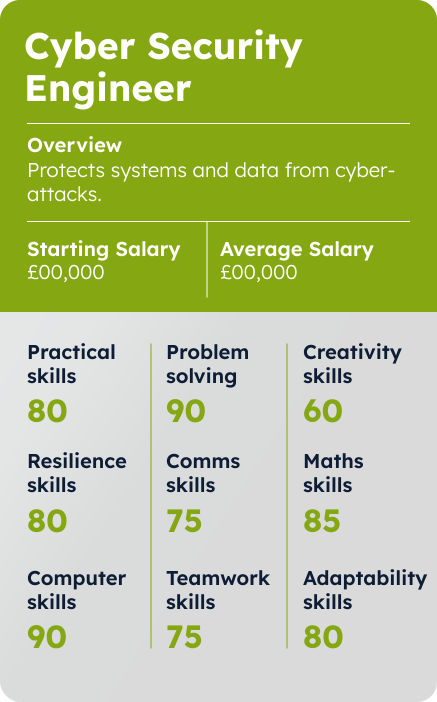
Cyber Security Engineer
What they do:
Priya protects computer networks and data from hackers and cyber-attacks. She monitors systems for threats, fixes security problems, and helps companies stay safe online.
What they like most about the job:
Priya enjoys solving puzzles and keeping one step ahead of cybercriminals. She likes knowing her work keeps people’s information secure.
How they got into their job:
Priya studied Computing at college, then took a Computer Science Degree. She now works in a government cyber defence team while finishing her Cyber Security Master’s Degree.
Priya studied Computing at college, then took a Computer Science Degree. She now works in a government cyber defence team while finishing her Cyber Security Master’s Degree.
Activity:
Spot the cyber risks
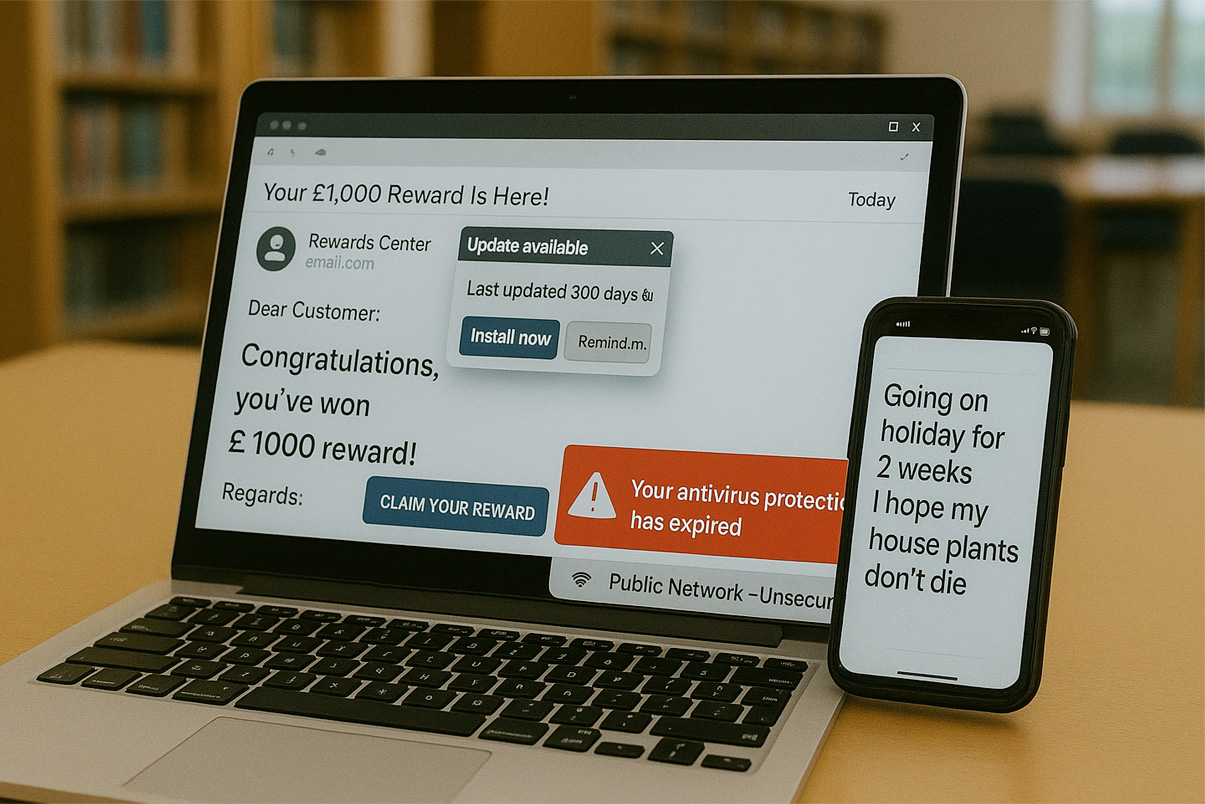
Every time we go online we leave a digital trail. Personal cyber security keeps your devices, accounts, and personal info safe from hackers and scams. This activity will help you spot common cyber risks and learn simple ways to protect yourself online.
Look at the picture. Can you find and click on the 8 risks?
Did you know?
A cyber-attack happens somewhere in the world every 39 seconds — but skilled cyber professionals are working behind the scenes to keep our data, systems, and identities safe.
Phishing Email
Risk:
Fake emails trick you into giving personal info, passwords, or downloading harmful files.
How to Stay Safe:
- Check the sender’s email carefully.
- Don’t click links in emails you weren’t expecting.
- Use spam filters and report suspicious emails.
- Confirm requests through official websites or contacts.
Antivirus Expired
Risk:
Without antivirus, your computer can get viruses, ransomware, or malware.
How to Stay Safe:
- Keep antivirus software updated and active.
- Turn on automatic renewal or reminders.
- Run regular scans for threats.
Password on a Sticky Note
Risk:
Anyone can see or steal passwords that are written down.
How to Stay Safe:
- Use a password manager.
- Make strong, unique passwords for each account.
- Turn on multi-factor authentication (MFA).
Unsecured Wi-Fi Connection
Risk:
Public Wi-Fi can let hackers steal your info or install malware.
How to Stay Safe:
- Avoid doing sensitive stuff on public Wi-Fi.
- Use a VPN to protect your connection.
- Only connect to trusted, password-protected networks.
Outdated Software
Risk:
Old software can have security holes that hackers exploit.
How to Stay Safe:
- Turn on automatic updates.
- Check for updates manually if needed.
- Delete software you don’t use anymore.
Oversharing on Social Media
Risk:
Sharing personal info, like travel plans, can put you at risk.
How to Stay Safe:
- Don’t post travel plans publicly.
- Share updates after you’re back home.
- Only show posts to trusted friends.
Unattended Computer
Risk:
Leaving your device logged in lets others access your accounts.
How to Stay Safe:
- Lock your screen when away.
- Set your device to auto-lock after inactivity.
- Use strong passwords and MFA.
Webcam Active
Risk:
Hackers could spy through an always-on camera.
How to Stay Safe:
- Turn off the webcam when not using it.
- Use a cover for extra security.
- Check which apps have access to your camera.
Digital Tech Careers
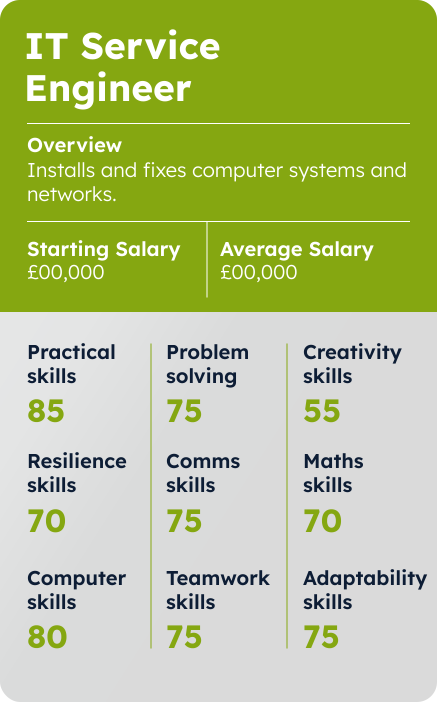
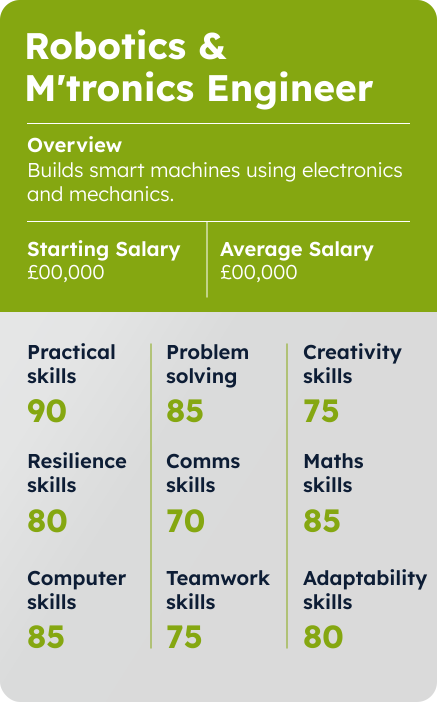
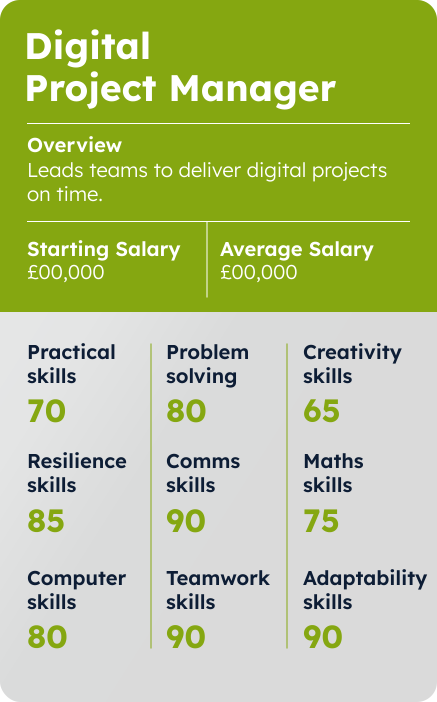
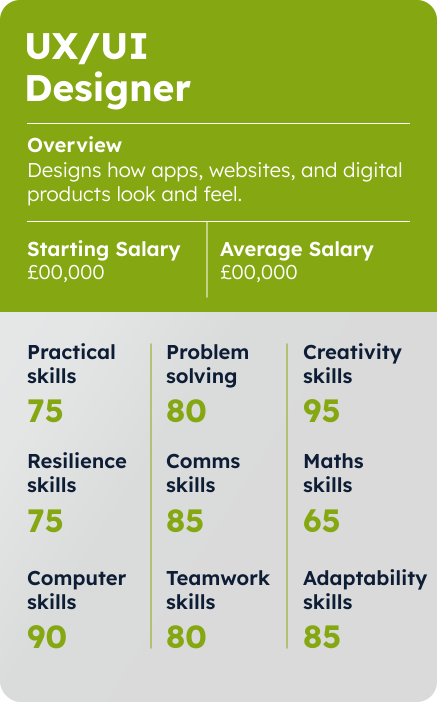
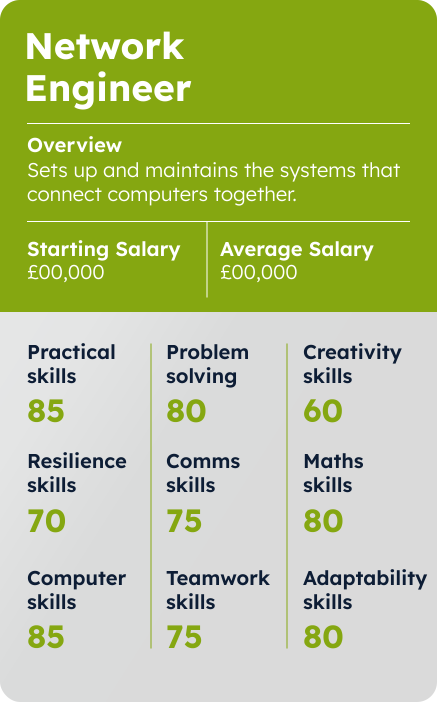
Digital technology offers a wide range of exciting careers. Let’s explore some of them and the skills you need to go into that career.
Simply drag and drop the career you’re interested into the spaces below to compare each option.












Check Your Knowledge
So now you’re well on the way to understanding about Digital Technology, answer the multi-choice questions below to see how much you really know.
Good luck!
Well done. You have successfully achieved the pass mark for this course. All the correct answers are now shown.
You haven’t achieved the pass mark on this occasion. Have another go.
You haven’t quite reached the pass mark for this course, but all of the correct answers are now shown. Please study these before moving on, or feel free to go back and look again at any of the pages of this course.
